![Fundmore-Logo.png]](https://help.fundmore.ai/hs-fs/hubfs/Fundmore-Logo.png?height=50&name=Fundmore-Logo.png)
What a switch/transfer actually is
A mortgage switch — also called a transfer — moves a borrower's existing mortgage from one lender to another. The balance and the remaining amortization stay exactly where they are. Only the term and the interest rate change.
That is the whole point of the transaction. The borrower gets a lower rate, better prepayment privileges, better service, or improved terms, without increasing their mortgage or stretching their amortization.
If the borrower breaks their existing mortgage mid-term, there will usually be a penalty. The savings from a better rate often more than cover it, and the penalty is avoided entirely when the switch lands at the end of the term. Most lenders allow the borrower to cap fees up to a set amount — commonly around $3,000 — to help offset the prepayment penalty and discharge fees charged by the outgoing lender, and most charge nothing to take a transfer in. A switch/transfer can be insured or uninsured.
What FundMore.ai does with it
FundMore.ai supports mortgage transfers directly: a mortgage moves between institutions without requiring a new property registration. The behaviours below are what an underwriter or fulfillment officer will encounter on the file.
- Fees can be capped into the loan. Add up to $3,000 to cover title and closing fees and per diem interest. Where the full $3,000 is not needed, adjust the mortgage amount down instead.
- No new money. A transfer deal adds no funds for debt repayment or penalty coverage. The transaction stays a transfer.
- Amortization stays under control. The existing amortization carries over. Where the file requires it, an underwriter can extend it up to a maximum of 25 years, and it is recalculated as necessary when the loan amount moves. Term selection remains at the underwriter's discretion.
- Payment or amortization — the user decides. When the transfer amount is edited on the Fees tab, a prompt asks whether to edit the payment or the amortization. Where the loan amount itself is adjusted, the same prompt offers the choice between recalculating payments against the updated amount and retaining the payment already agreed.
- Reductions do not need lending authority. Fulfillment can reduce the total loan amount without an approval step. Increases to the loan amount may require approval.
- Lower payouts are handled. When a payout comes in below what was expected, the total loan amount and the payments can be realigned to match.
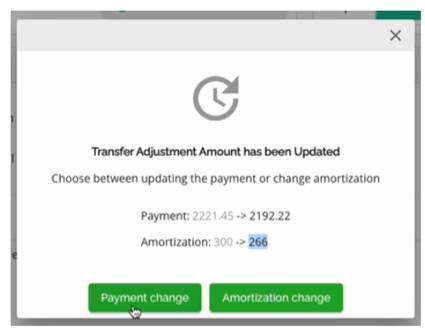
The prompt. It is one or the other. Take the payment change and the amortization holds while the payment moves ($2,221.45 to $2,192.22); take the amortization change and the payment holds while the amortization shortens (300 months to 266).
- Reductions do not need lending authority. Fulfillment can reduce the total loan amount without an approval step. Increases to the loan amount may require approval.
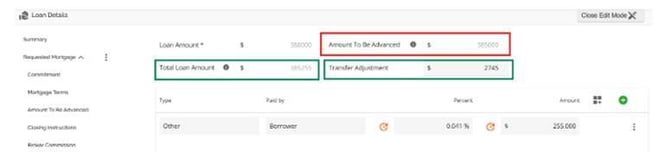
Loan Details on a switch/transfer. The Total Loan Amount is the Amount To Be Advanced plus the fees capped into the deal: $385,000 + $255 = $385,255. What is left between that and the approved Loan Amount becomes the Transfer Adjustment: $388,000 − $385,255 = $2,745. Adjust the fees and the two figures move together.
- Lower payouts are handled. When a payout comes in below what was expected, the total loan amount and the payments can be realigned to match.
Purpose and classification
Switch/Transfer is an application purpose in its own right, and it carries two classifications: Switch/Transfer Standard and Switch/Transfer Collateral.
When a deal is ingested from an origination or broker source, the application purpose is mapped and populated automatically. The classification list then follows from the purpose selected. Both remain editable: an underwriter can override either one manually if the incoming mapping is wrong or absent.
|
WORTH KNOWING Insurers such as CMHC and Sagen do not define Switch/Transfer as a loan purpose — it exists on the insurer side as a classification only. Where a switch is insured, the handling differs from a new insured deal. See below. |
Insured switches
Where the original loan is already insured, the existing policy carries over and no new insurance request is submitted. The policy number and insurer are keyed manually on the requested mortgage so they carry through to downstream systems; the product name is derived by the system.
Two settings matter at setup, and both are easy to miss: the insurance premium must be set to 0.00%, and include premium in mortgage must be left unticked. If either is wrong, the file will represent the insurance incorrectly downstream.
Setting up a switch/transfer — checklist
The fields below are what a switch/transfer file needs. Some are environment-specific and will not appear in every configuration.
Loan Details — Summary
|
FIELD |
WHAT TO SET |
|
Application Purpose |
Switch/Transfer |
|
Purpose Code (if used in your environment) |
Assignment/Transfer |
|
Purpose (free form) |
Switch |
|
Loan Amount |
Set $3,000 higher than the current mortgage balance |
|
Mortgage Classification |
Switch/Transfer Standard, or Switch/Transfer Collateral |
Requested Mortgage
|
FIELD |
WHAT TO SET |
|
Insurer and insurance account number |
Enter where the loan is already insured and the details were provided up front. Do not submit to the insurer — capture the information only. |
|
Insurance premium |
0.00% |
|
Include premium in mortgage |
Unticked |
|
Rate (if applicable in your environment) |
Select the applicable purchase rate — conventional or high ratio |
Property Details & Closing Instructions
|
FIELD |
WHAT TO SET |
|
Original purchase price |
As provided |
|
Existing mortgage |
Complete every field for which information was provided, and mark the mortgage as Switch/Transferred |
|
Original insurer and policy number |
Where applicable |
|
Outgoing lender and mortgage number |
As provided |
|
Registration type (if applicable in your environment) |
Standard |
|
Maturity date |
Where available |
|
Broker commission and registered charge |
As applicable to the deal |
|
Closing instructions — service provider |
FCT |
The short version
A switch moves the mortgage, not the money. Keep the balance and the amortization intact, cap the fees rather than adding new funds, decide deliberately whether the payment or the amortization absorbs any change in the loan amount, and — on an insured file — carry the existing policy forward rather than requesting a new one.
Environment note. Several of the fields above apply only where your environment uses them, and are marked as such. If a field described here does not appear in your instance, or you are unsure which setting applies, speak with your FundMore.ai implementation contact.